


Don’t you hate how every time an architect gives you a floor plan, you have to manually create the analysis model?
Well, Ryan did.
That’s not his real name, but that doesn’t matter here. He told me how every time a client gave him a floor plan as a DWG file, he had to redo the whole thing in ETABS. It wouldn’t take him long, maybe two or three hours to get a working model.
The problem, and it’s a classic one, is when something changes. The client changes the shape of the slab, the walls move to accommodate new services or, Ryan’s favourite, they move the columns because “it doesn’t look good”.
Well, all those changes can be justifiable, but that doesn’t make updating the analysis and design side of things any easier. Thankfully, we have AI agents now.
He vaguely remembered learning Python at university, but there was no way he could build a system this sophisticated. So, he bought a subscription to Claude Code.
He described what he wanted to Claude and it started asking for permissions, all of which he promptly accepted. It installed Python, installed a whole heap of dependencies and started writing Python scripts to the folder. As it built the tool, Ryan kept chatting with it, correcting it as it went and ensuring it was on track. He even told Claude to account for clients using different drawing conventions. Claude agreed and proceeded to “account for it”.
About two days later, he had something working. He even used it on his current project. And it worked so well that Ryan brought it up with his manager. Ryan demonstrated the script Claude made and how it had saved him hours for each floor plan. Feed it an architect’s floor plan and it could create an ETABS model in seconds.
His manager reviewed the ETABS model and was so impressed that Ryan got the green light to take it further. He was tasked with making it “official” for the rest of the engineers in the company.
Hi, I’m Braden
I write about the craft of computational design, from working with geometry and data to the experience of building tools for other people.
If you’re new to CodedShapes, welcome! You might enjoy these:
If you’d like help with a workflow of your own, let’s work on it together.
“Deployment”
So, the first thing Ryan did was ask Claude how to share his tool. Claude zipped up the folder of scripts, and he emailed them to other engineers along with instructions Claude wrote on how to get started.
It was a short email explaining how to install Python, create a virtual environment and install the dependencies from requirements.txt. Then, all they had to do was open a terminal and run python main.py.
That may sound logical to me, but to his other engineering colleagues, it might as well be written in Latin. So, they did what any of us would do when we don’t understand something. They asked Google AI.
And it was somewhat manageable. His colleagues got Python and all the dependencies installed, but the scripts didn’t work. Something about “Unable to find C:\Ryan\Files\modelconfiguration.txt“.
Ryan, not knowing what that error message meant, asked Claude about it. And apparently, Claude had used some files specific to Ryan’s computer, which is why it didn’t work on other computers.
So, no biggie, right? Ask Claude to fix it and send it again, which is what Ryan did.
Then there was another error: “null exception: expected string, got object instead”.
And another: “Cannot execute Convert_function, ExceptionCode: xcstsen10pesst”.
Ryan and Claude kept working through the failures, squashing each one, but more kept popping up.
Three weeks went by like this. A big source of the errors was that the tool had not fully accounted for the different ways architects draw their floor plans, even though Claude kept saying it did.
In fact, when I spoke to them, some of Ryan’s colleagues had become so frustrated that they were starting to think they could build something better themselves with AI...
A middle ground
It was around then that Ryan reached out to me through LinkedIn. After chatting for a while, we scheduled a call to look into it further. Ryan’s manager was on board with the idea too. Since they couldn’t get the tool working consistently, they knew they needed some outside help.
After I looked at the scripts and the floor plans they’d tried, I could see how they’d got stuck. Each time a new drawing broke the script, they went back to Claude for another fix. Claude added another rule, but they were still asking the same script to interpret every client’s drawing conventions.
Client A used a “FLOOR” layer for the slab (it didn’t care about colours).
Client B used a custom blue “dash dash” line style for the slab.
Client C’s floor plan used the colour red for the slab.
Client D used a “dash dash” line style for the slab but the colour red for its walls.
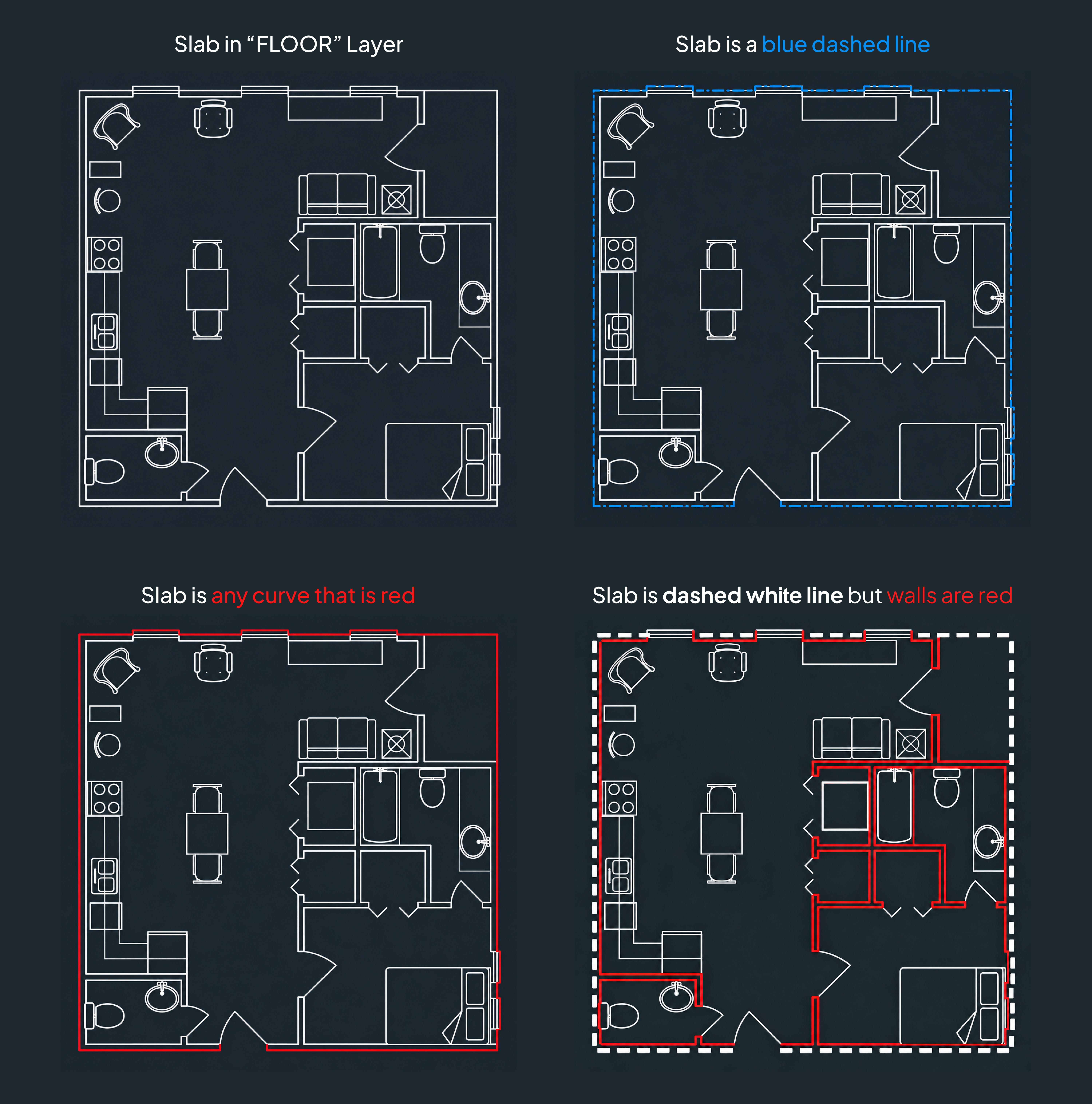
So, Claude kept adding band-aids, but the rules conflicted and the resulting logic just didn’t make sense. It was like whack-a-mole. Solve it for client A and it breaks for client B. Solve it for client C and it might break client B.
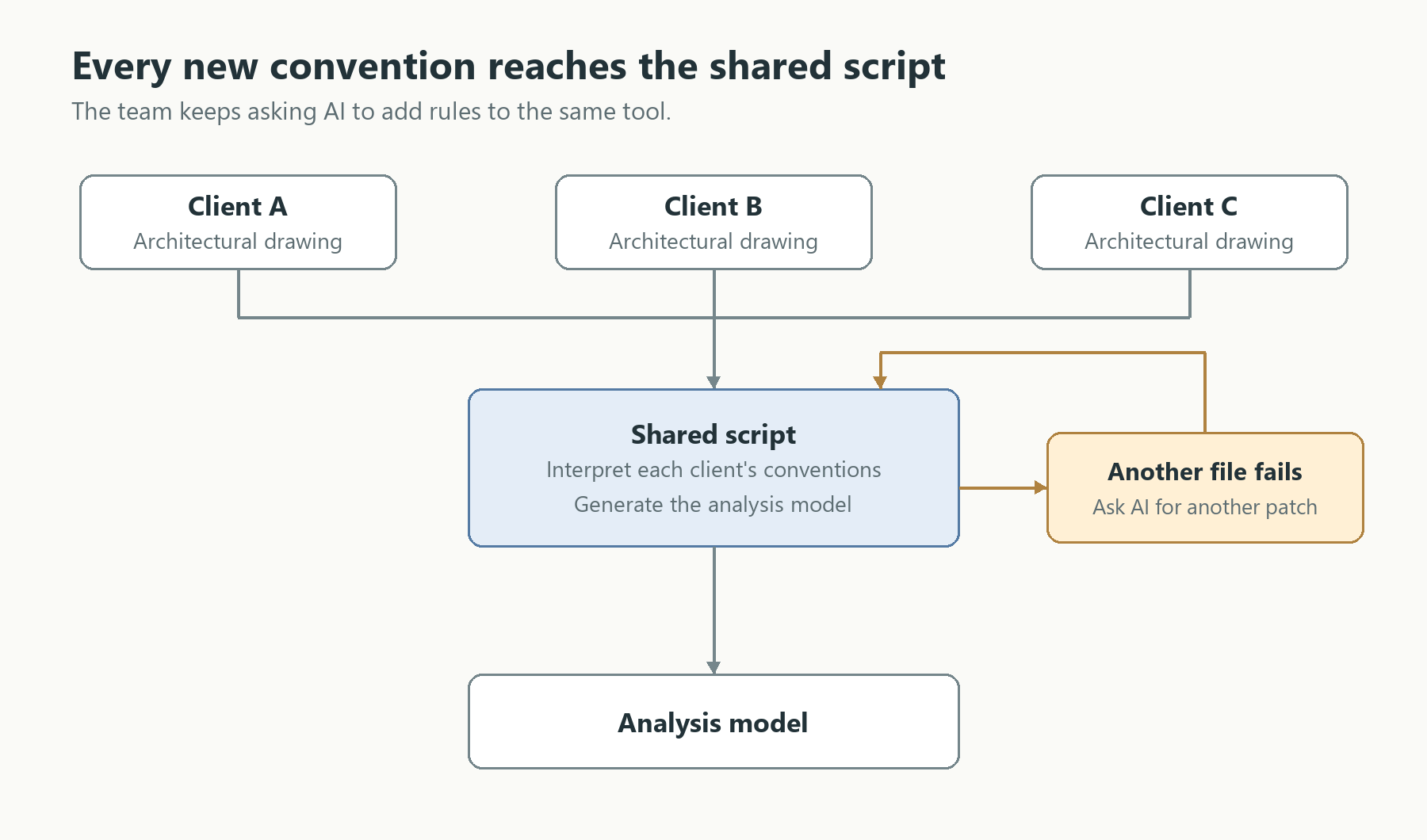
They were stuck in a loop, asking AI for more fixes within the same approach. They needed to reconsider the process around the shared script, including what data they expected it to work with.
My suggestion was to introduce a middle ground: a floor-plan standard that would give the script a consistent format to work from. Over the next few sessions, we worked on that drawing standard. Things like layer colours and names, geometry types, line types and what they all represented in the analysis models.
That also gave engineers in the company an agreed way to read a prepared floor plan. Beyond this script, future tools could work with the same notation if they were built to interpret it.
But of course, that brought the problem full circle. If they now had to draw this new floor plan, the work of redrawing an architect’s floor plan hadn’t gone away.
Well, that’s where we brought AI back in.
Using AI as the adapter
With an agreed format to work towards, an engineer could use AI to write a script that translated a particular client’s floor plan into that format. The cleanup script could be specific to the project, without having to account for every other client’s conventions too.
That made room for quick, throwaway scripts. If a cleanup script helped with the drawings in front of them, it didn’t have to become another tool the whole company had to use and maintain. Engineers could use AI to create a script that converted the floor plan for that project or client to the new format, then throw the script away.
They could even do it manually if they wanted to. And now, because we had a standardised floor plan, they could inspect the prepared drawing and correct anything the script had missed before generating the analysis model.
It’s a manual stopgap, but the entire automation system produces better results, gives engineers more control and is way more stable.
A temporary script generated by AI has a different set of requirements from a tool the company will use across projects and teams. Ryan had already shown how useful AI could be when he built something for his own project. Now, with a defined goal (the consistent drawing format), they can use AI to help prepare the input and still get the benefits of automatically generating their analysis models.
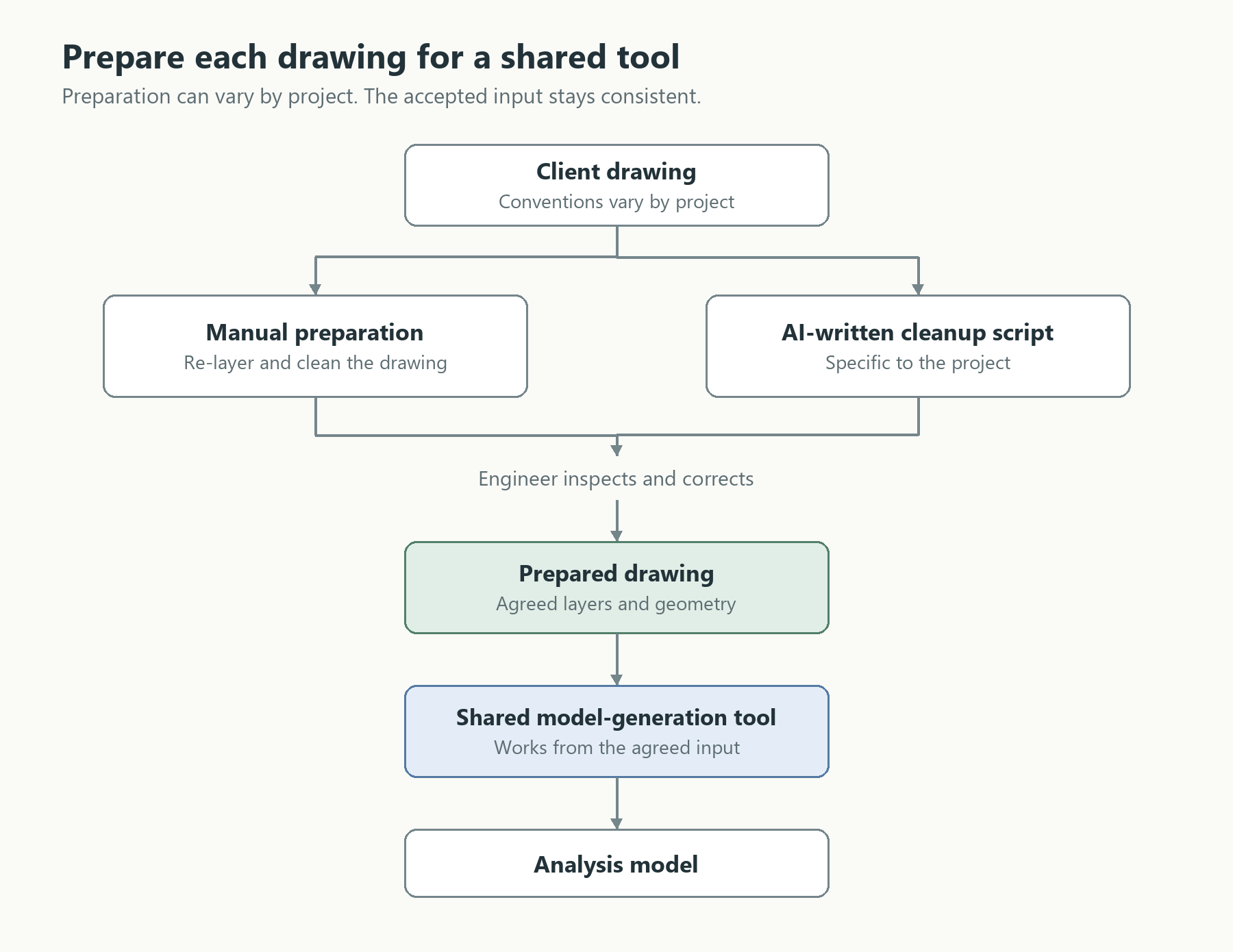
And they can keep using AI for the model-generation tool too. Separating the shared tool from the temporary scripts gives it consistent data to work with. They can think about how AI helps across the whole process, including how the scripts fit together.
Building a system around AI
Ryan understood what needed to be solved. Recreating models from architectural drawings took time, and he’d used AI to automate that. His project and time savings showed why it was worth making available to the rest of the team.
Making it part of the team’s process meant thinking beyond just getting it to work. They had to consider how other engineers would use it, how it would be maintained and how it would deal with different clients’ data.
In this case, we agreed on the input the shared tool would accept and let engineers choose how to get there.
If you want something other people can use consistently, you have to think of the whole system. Decide what needs to be consistent and where things can be temporary. AI can help you build each part, but you still need to decide how those parts should work together.
Thanks for reading. If you’d like more articles like this, subscribe to CodedShapes to get them delivered to your inbox
Work with me: https://codedconstructs.com/contact/
Computational Design Courses: https://learn.codedshapes.com/
Scripository (A library of computational scripts): https://scripository.com/