


There are hints when your project is about to get expensive.
“It’s not quite right.” Or “that’s confusing.” Or my personal favourite, “it’s not really what I had in mind.”
They are all sentences I have heard after spending weeks, sometimes months, building something.
You’d think after all those meetings and documents, we’d be on the same page. Heck, you’d think after every development update, we’d be on the same page.
But no, we never actually agreed on anything. Everyone just thought we did.
The great enemy of communication, we find, is the illusion of it.
~ William H. Whyte
There are so many assumptions swirling around in our heads that the same sentence can mean completely different things depending on who hears it. Someone says “yes, the tool will handle changes”. To the engineer, that means the tool updates as the design changes. To the manager, it means the tool tells the engineer when she needs to update the model.
Exact same sentence, different interpretation.
Hidden misalignment
You can come away from every meeting and call satisfied, with everyone apparently on the same page, and still get it wrong.
It’s only when you build the thing and put it in front of them that anyone can disagree. Because for better or worse, building something and showing it will confirm or deny their assumptions.
The cost is that it might take you weeks or months to find out nobody ever agreed in the first place. That time to build has definitely shrunk thanks to AI. But even then, you still have to clean up or fix something that should have been accounted from the beginning. It’s still the cost of building the wrong thing first.
Regardless of how quickly you made it, code is an expensive place to discover disagreement.
Once something is implemented it’s rework, not design. Maybe it turns out you never agreed on the core workflow. Maybe the philosophy was wrong from the beginning. What are you going to do with the 5,000 lines of code you the LLM wrote?
It’s like a tax. The longer you put off coordinating with everyone, the worse the bill gets, and everyone “agreeing” in every meeting feels great until you’re dumping two months of work down the drain.
Unfortunately, human communication is messy and it takes real effort to get everyone on the same page. So, you don’t get to skip this kind of work, you only get to choose when you pay for it. It might feel like a waste of time, but it’s always cheaper to pay it earlier, because the bill grows the longer you put it off.
In fact, my three biggest failures in computational design, had nothing to do with the technical stuff and everything got to do with a lack of clarity and alignment.
Hi, I’m Braden
I help teams be more efficient in the AEC Industry, then share stories about it here. I also have courses, guides and scripts as part of CodedShapes Pro
Check it out if that sounds like you.
If you’re new to CodedShapes, welcome! You might also enjoy these:
Got an automation in mind ? : https://codedconstructs.com/contact/
Three things I want agreed before I build
Now that I run my own consultancy, I’ve put things in place from experience to keep everyone aligned before and during development. It’s not foolproof, but it at least gives us a fighting chance.
It comes down to three things that need agreeing. How someone will actually use the tool, what it needs from them, and how we’ll both know it worked.
I call them agreements rather than requirements or a spec because a spec is something that can be perfectly written and still be a document only one side agrees with. An agreement requires both parties to sign off.
Yes, none of this is new and most of us already know it. You might even have discussed all three in some shape or form. But the key here is to write them down.
It becomes a shared space that everyone can point at and discuss. Instead of assumptions and thoughts floating around in people’s heads, it’s written down concisely and clearly.
I do all of this in my proposals to clients. On a complex tool it might take a few meetings to get there. On simpler things it might be a single meeting. It’s really about having something concrete to work off.
No. 1, How someone will actually use it
I had a previous client who wanted a Revit plugin to help them model steel framing. They knew the problem inside out. What we couldn’t agree on was how the tool worked.
Every meeting went the same way. The conversation felt good, like we all knew what the tool would do. And then someone would break that dream and ask “okay, so that means the tool automatically rotates the members, right?” and the illusion shattered, because we had never discussed rotation before.
We were each describing a workflow that looked completely different in our own heads.
After the third meeting, I got sick of going round and round. So instead of coming in with notes, I spent an afternoon sketching the workflow and how I thought the tool should behave. Taking a page out of the UI/UX playbook, I showed a markup of the tool rather than describing it.
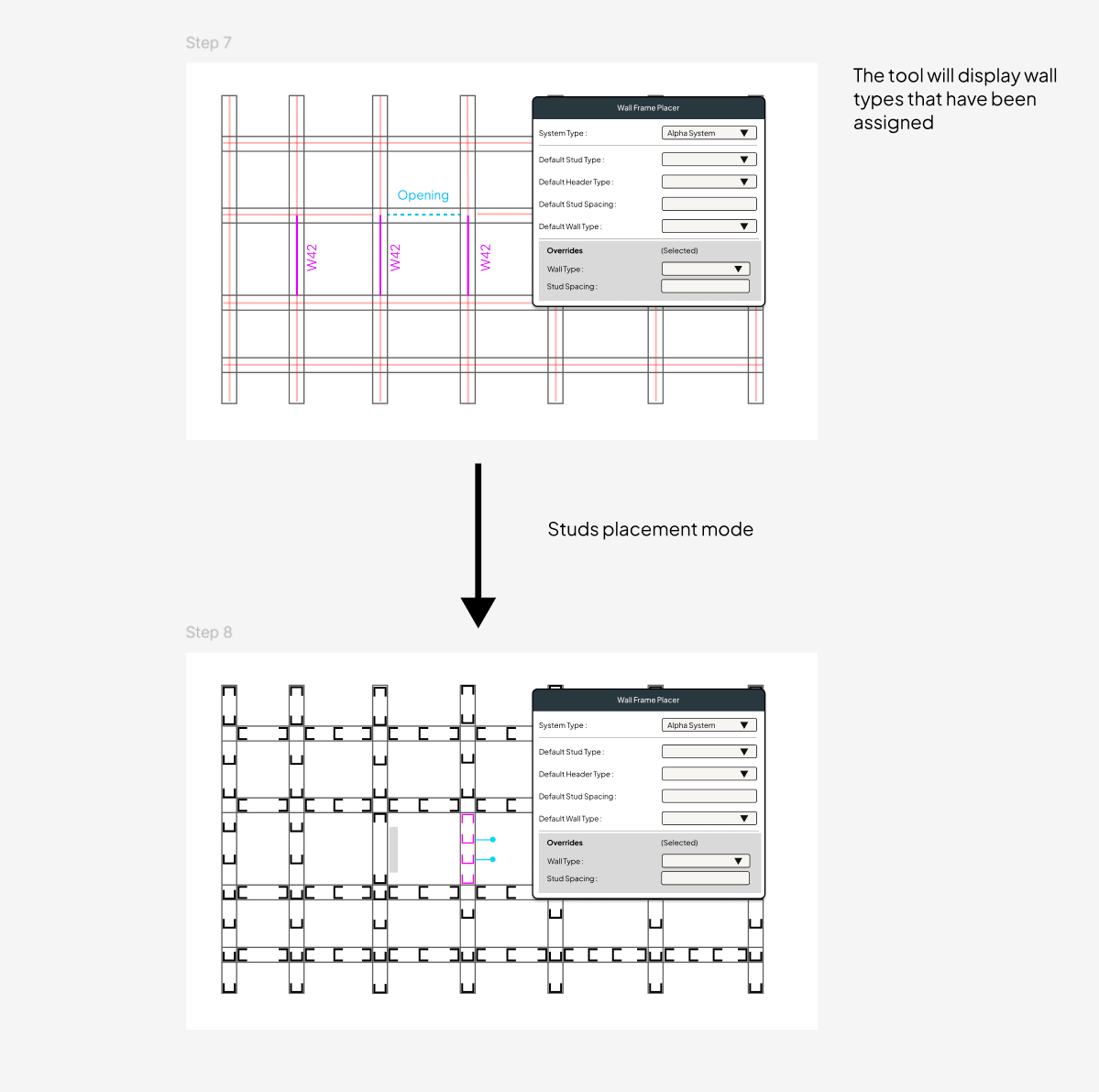
The next meeting was completely different. Everyone suddenly had something to point to instead of just describing things. Every step and assumption was laid bare for them to see. That diagram became the source of truth.
That’s the first agreement: How someone will actually use the tool.
This is the step that most people skip. I have skipped it too. I pride myself as a “people person”, which to me meant that clients should say “fix my problem”, give me a wink, and I’ll solve their dreams. But as we’re all finding out with LLMs, we have to get better at telling people and AI exactly what we want. That’s what the diagram did.
Vague and unclear requirements lead to vague and unclear tools.
So now, for every project I take on, I put in the upfront effort of clarifying exactly what the tool will do.
No. 2, What the tool needs to do its work
That same diagram helped out from another angle. It made the starting point and the assumptions visible.
In the earlier meetings, the client and I talked about the tool starting from a blank model, or maybe the user fills in a form, or maybe a floor plan.
When I drew the diagram based on how I thought the tool would work, I unconsciously gave it a starting point. Which told the client exactly what the tool needed to work.
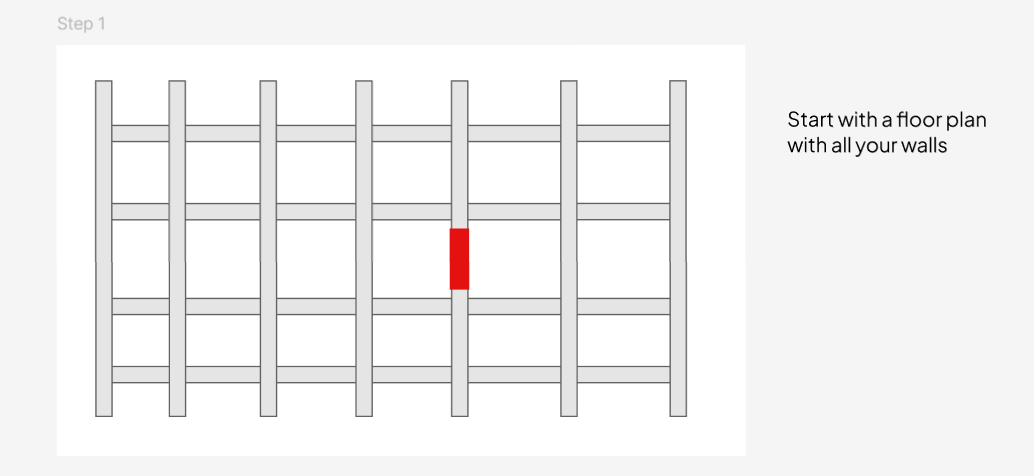
That’s the second agreement. What the tool needs from you. and what it’s allowed to assume.
Every automation is a stack of promises about the state of the world. It takes an assumption, encodes it, and works from there. In this case, we agreed the tool would start from a floor plan with walls already modeled in, and that those walls were floor to floor and never half height. How they got into the model was outside the tool’s scope. We also agreed it would only use a list of verified steel members in its functions.
These are the rules of engagement. A list of exactly what the tool needs, and what it doesn’t support to execute the agreed workflow.
The tricky part here though, is that you can’t capture all of it without making the tool. The number of things that could be true about someone’s Revit model is effectively endless.
So the goal isn’t to be exhaustive. It’s to catch the critical ones before you invest time in development. Unfortunately, that comes down to experience. Because I have made countless Revit plugins before, I can make a guess on what the rules might be.
The half height walls are a good example. It’s a rule because I know that Revit won’t allow us to execute the workflow that we want. That’s just from past experience. So, I brought it up in a meeting, wrote it down, and everyone agreed it was a rule for the tool to work.
Identifying those exceptions takes experience, and I still miss things. But at least we capture what we can at the time, instead of arguing later.
No. 3, How we’ll know the tool works
Switching gears for a bit. A few years ago I worked on the façade movement analysis for a high rise tower. It was a complicated façade and we knew we had to analyse it, but we didn’t know why. All the client told us was to make sure it was all okay.
That forced us to understand what we were even doing. Analysis and “work” can mean a thousand different things, so we set about exploring. What can we analyse, what results can we get, and what do they ultimately mean for the façade.
We ran rigid body experiments to work out what to measure. We built Excel sheets to check the maths independently. We even 3D printed a small joint to check our simulations. All of it was us trying to understand what “make sure it’s all okay” meant.
The result was a series of metrics that told us whether the joints would open or close under the building load. If we could understand how much the building moved, we could understand whether the façade panels would clash into each other.
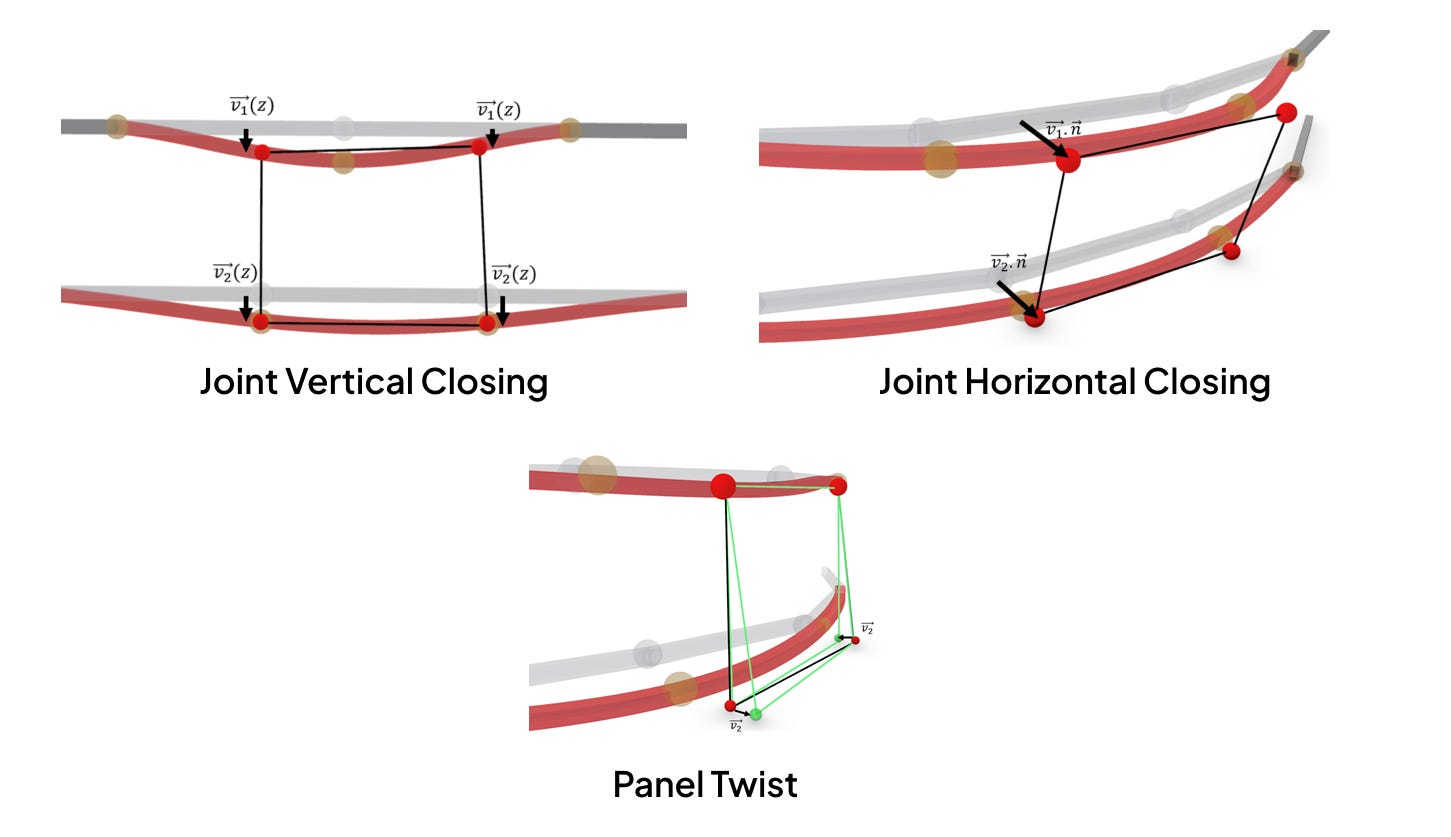
That’s the third agreement. How everyone will know if the tool works.
It’s easy to skip, because by the time you’ve agreed on the workflow and the inputs it feels like the work is done. Which is the same trap as before, everyone assuming they’re already on the same page.
And to be fair, “done” is hard to define, but it has to be defined, because it’s the last part of making the tool concrete.
For a custom tool it means agreeing to a set of representative files, the output each one should produce, and what happens when we run them. I do this as test cases and a checklist. I’ll ask a client for five to ten files that represent their typical working situation, and together we write the checklist the output of the has to meet.
This is what we call User Acceptance Testing. And it’s all about agreeing on what the tool should produce and under what circumstance.
It’s here that a tool stops being “it should work like this” and becomes a list of tests that it passes/fails against. A list that has been agreed on by both sides.
It’s not formality for its own sake, it’s clarity
It probably sounds like a lot of effort and paperwork before the tool gets built.
It can be, but the goal isn’t formality for its own sake. It’s clarity. A small script might need one meeting and a couple of pages. A complex tool might need a few meetings and a denser proposal. Either ways, it’s the same three agreements.
The size of the build changes the amount of effort and paperwork you have to do but it doesn’t change whether you need to agree.
Meetings are good and I have a lot of them, but a conversation doesn’t produce anything solid that everyone can poke at. It also can’t hold the details of a complex tool. A diagram or a few paragraphs can.
For every project I have done, the biggest problem has always been believing you’re aligned when you’ve never tested whether you actually are. Again, it isn’t foolproof. It just gives you a much better chance.
Alignment and clarity
The goal is alignment and clarity. If everyone agrees and understands exactly what will be built, the problem it solves and how it solves it, everybody wins.
Unlike physical things we can touch and hold, a digital tool lives in the ether. Its abstractness is hard to visualise, and even when you can, everyone visualises it differently. Digital tools have real value, but we have to do the work to define them better for everyone involved.
Things will still change midway and sometimes the scope blows out. But there’s a real difference between finding out you disagreed and finding out you never agreed at all.
So whenever you’re about to build something, think about these three and write them down. Bring as much clarity and alignment as you can before anyone starts.
Thanks for reading.
Thanks for reading
Subscribe to CodedShapes to get more articles like this delivered to your inbox
Work with me: https://codedconstructs.com/contact/
Resources on Computational Design: https://www.codedshapes.com/p/scripository