


On the bottom right corner of any engineering or architectural drawing, you can find the initials of the people who drew, checked and approved it. Somewhere nearby, you can usually see a history of how the drawing has changed and who worked on it.
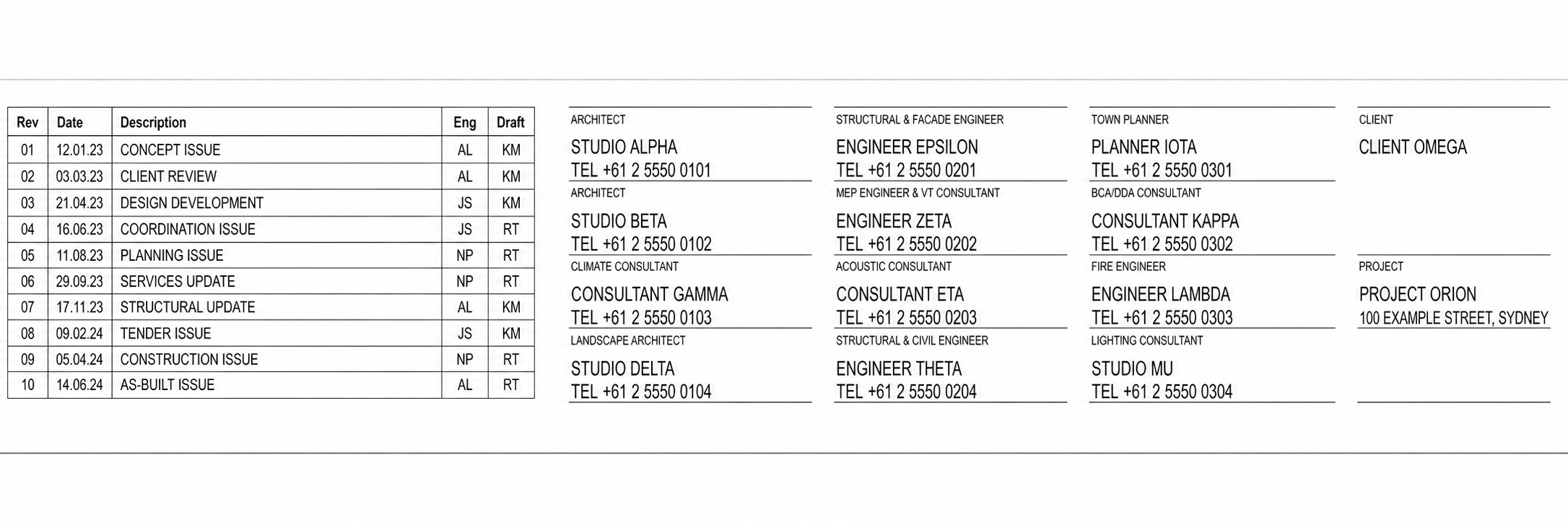
Yes, it gives people credit but more importantly, it shows front and center who is responsible for it. It’s not “who’s the amazing genius that drew this”, it’s more “if this went horribly, who do we blame”.
And yeah, it makes sense. A drawing depicts something real and if it goes wrong, people can get hurt. It’s why the approval process can be so rigorous. Only a qualified person can sign off on drawings and there’s usually a round or two of review before someone on site sees it. Heck, even with all of this, companies still pay a lot in insurance because the risk doesn’t go away.
Now, imagine me. Coming along and pushing digital work in the AEC to these people. But there’s no title block for a script or a tool. Sure, my name is on the tools that I make, but it doesn’t carry the same weight. If the tool goes badly, I might lose a client or damage my reputation. The professional responsibility still lies with the person who signs off on the drawing, not the tool or how we got there.
Their name is on the drawing, their registration sits behind that name and the company has insurance in case something goes wrong. It’s also why we don’t yet let AI design buildings on its own.
“AI cannot be held accountable, nor can it replace the training, experience, and judgement of a professional engineer.” - ASCE, Policy Statement 573 (2024)
I still have a responsibility as the person who made it. I should be responsible for how the tool behaves, what its limits are and what happens when it stops working. That is a different kind of responsibility from the one carried by the engineer, but there’s just no formal bearing for it.
The lack of accountability on with tools and AI is why human judgement has to stay in the loop, but it only answers one side of the problem. Because if the engineer still carries the professional responsibility, what would make them put their name behind a custom tool built by someone else?
Hi, I’m Braden
I help teams be more efficient in the AEC Industry, then share stories about it here. I also have courses, guides and scripts as part of CodedShapes Pro
Check it out if that sounds like you.
If you’re new to CodedShapes, welcome! You might enjoy these:
Got a workflow in mind ? Let’s build it together.
The answer is trust
When someone looks into automating something, we don’t have to jump straight to custom tools. Think about using Excel instead of pen and paper.
When you work out 1 + 1 by hand, you use your judgement at every step before writing down “2” as the answer. When you do the same thing in Excel, you exercise that judgement earlier. You decide that Excel can be trusted, then allow it to perform those steps for you.
You haven’t given up responsibility for the answer, because if it spits out “1654”, you as the human need to know that’s wrong. But you have given up some direct control over how it was produced. Part of the judgement moves into the tool while the accountability stays with the person approving the result.
That decision is easy with something like Excel. It has been around for years, its limits are familiar and there are established ways of checking its output. Thousands of other people use it every day. It has earned enough trust that most of us don’t stop to question every calculation.
A custom-made tool like a plugin or standalone application doesn’t have any of that.
Not only would it have been made recently (time hasn’t had a chance to test it), every tool is arguably one of a kind. Because it’s unique to each client’s workflow. It’s kind of the point. Industry-standard tools are made to work for everyone, while a custom tool is developed around the way one team works and the exact problem they need to solve.
It’s like the difference between buying a suit from a shop and having one made for you. The one from the shop is familiar and predictable, but it probably won’t fit perfectly. The custom suit should fit the way you need it to, but you have to trust that it won’t rip apart the minute you move too much.
The benefit of a custom tool is that bespoke fit. The cost is that it has no history, broad adoption or familiar process to fall back on. You can’t just ask someone next to you why your custom tool isn’t working, the same way you can with Excel. Without the custom tool, the work might be slower and painful, but at least you can see and control every step.
So what gives a custom tool enough credibility for an engineer to put their name behind its output? It can’t borrow trust from years of use. Someone has to take responsibility for earning that trust.
Building trust with digital ownership
It’s not enough to say “trust me bro, the tool I build will solve all your problems”.
Ownership is how we make a custom-built tool less of a leap of faith. It’s about reducing the risk and clarifying what the tool does, what it needs and what happens after it has been built. It’s really a two-way thing.
I don’t want to come in, tell you how to do your job and then leave when things “get real”. When I say ownership, I mean having a real stake in what happens after the decision to build. You should be able to trust what I’ve built, know that I can explain what happened when it fails and have a plan for what happens next. The engineer still owns their judgement and the final call on the output. The part I can own is how the tool behaves and what it produces when it’s used appropriately.
That responsibility doesn’t have to stay with me forever, but it can’t disappear when the build ends either. It needs a known place to go.
For a tool that has never existed before, there are three questions that define ownership to me. They follow the life of the tool: what it needs to achieve before we build, how people can understand it while they use it, and who looks after it afterwards.
Then, when we can answer these questions, we have to write them down, so that they hold whoever built the tool accountable to the people relying on it. It turns the abstractness of digital work into something with a clear input, steps and outputs.
How do we ensure the tool does what you need?
The first risk is that it doesn’t do what you need. It’s not broken, it just doesn’t solve the problem the way you thought it would. It’s like making a wish with an evil genie, wish to be the smartest in the world and the genie does it by making everyone around you stupid. You got the result but just not what you actually wanted.
So, the first step before building anything is to get clear on what it is we are actually solving. It’s not just a “let’s automate this” and we just do it. That’s why the scoping conversation, prototyping and research are a big part of the work. They are often treated as the necessary evil before building the actual tool, but it’s really the most important part.
The whole point of a custom tool is to build something that solves your problem the way you need it to. If we don’t agree on the problem and what a useful result looks like, we can’t build a tool that is actually valuable for you.
The suit analogy matters here too. A tailor can’t make something fit by guessing. You have to get fitted, choose the material and decide on the style. The tailor should make recommendations, but ultimately you have to decide if it’s something you want. Scoping a custom tool works the same way.
How do we know what the tool is doing?
Once we’ve ironed out the specifics of what the custom tool will solve, how does it go about doing that?
In Excel terms, what happens when I put in 1 + 1 * 10? Excel gives me 11 because it performs the multiplication first. It has the same rules that we use in our heads, so that the steps it performs is correct.
Understanding a custom tool works the same way. We need to clarify the steps it takes and the assumptions it makes. For a complex tool, this happens at a high level so that everyone involved can understand it. You don’t need to understand the code, just the intention and the main steps it takes. It’s my job to communicate that to everyone involved and ensure that we all agree on how the tool works and what’s needed to make it work reliably.
For my engagements, this normally means testing the tool against sample models and files, then agreeing on whether the result is correct. Trying as best to simulate real world working conditions and ensuring that the tool produces the ideal output.
A tool you can’t understand is a tool you have to take on blind faith. And because it’s a “one of a kind” tool, there are no YouTube videos to help you. The person building it has to make its behavior clear enough for the people putting their names behind its output.
Who looks after it when something changes or goes wrong?
The first two questions can be answered during the build. The third needs an answer for as long as the tool remains in use. Once the tool is made, somebody still needs the time and authority to maintain it.
A tool might work perfectly for the first five projects, then stop because the software was updated, the input format changed or the team started working differently. Software isn’t a “set and forget” thing. The tool has to be revisited when the environment around it changes.
There is also a difference between a defect and a changed requirement. If the tool stops working against the requirements we agreed on, that is a defect. If the software, inputs or workflow have changed, that is new work.
The point here is that there should be a clear path forward to keeping the tool usable and maintained. If a client stopped working with me tomorrow, they should still be able to understand the tool, use it and find someone else to maintain it.
I think of that person as the named tool owner. They aren’t responsible for every way somebody uses it. The engineer still owns that judgement. The tool owner understands how it behaves, keeps the documentation together, coordinates changes and makes sure problems have somewhere to go.
This responsibility could stay with the original developer, perhaps through a retainer if it’s an external person like me, or it could move to someone inside the company. Either way, it’s about making the responsibility explicit before everyone moves on. Just because the tool works now doesn’t mean the work is done.
The responsibility for the tool needs a home, and whoever takes it needs the knowledge, time and authority to act.
Why most tools never get an owner
A lot of internal tools don’t start as tools. They start as an answer to an immediate project problem. Someone opens Grasshopper, Dynamo, Excel or whatever else they have and builds a way through the work in front of them.
At that point, success means getting the project delivered. If the script works, it has done its job. Nobody stops to decide who owns it, how it should be tested outside that project or what happens if another team starts relying on it.
But useful tools spread. Someone shares the file, another project picks it up and eventually the person who built it becomes the default contact whenever something goes wrong. They are treated like the owner because they know the most about it, even though nobody gave them the time or authority to actually own it.
The work that would make ownership real sits between roles. Scoping the problem properly, making sure people understand what the tool does, testing it, writing things down and planning who looks after it are all part of the tool’s life. But they aren’t the visible act of building it, and inside a company they aren’t always billable.
So when project work takes over, those are the first things to lose time. The tool can still have a builder and plenty of people using it, but no one has formally taken responsibility for what happens next.
The builder might care about it. They might work nights or weekends to keep it alive. But without an owner, the tool eventually fades away or becomes so brittle that everyone’s afraid to modify it.
This is why ownership has to be more than a name attached to the file. It has to be assigned. Somebody needs the knowledge, time and authority to look after the tool from the first conversation through to the day the workflow changes.
What this looks like in practice
I’m not trying to change who carries professional liability in the industry. We made the tools, so we should be responsible for how they behave. Not for how they’re used.
In practice, the answers to those three questions need three places to live.
The problem, agreed outcome, acceptance criteria and support boundaries belong in the proposal or contract. It doesn’t have to capture every detail, but it should make the commitment clear before the building starts.
The inputs, assumptions, main steps, limits and test results belong in documentation that stays with the tool. That gives the people using it something concrete to check rather than asking them to rely on memory or blind faith.
Before the build ends, the tool needs a named owner and an agreed path for maintenance or handover. That is how the responsibility survives after the original builder moves on.
That is what I mean by digital ownership. It is the responsibility around the tool that the title block gives to the drawing. When that responsibility is clear, people have a reason to trust the tool rather than taking it on blind faith.
Thanks for reading.
Thanks for reading
Subscribe to CodedShapes to get more articles like this delivered to your inbox
Work with me: https://codedconstructs.com/contact/
Resources on Computational Design: https://www.codedshapes.com/p/scripository