


You ever thought to yourself, “man, we see this all the time, if we just put in 2 more weeks, we can build a solution for this”
Well, I too, was once that naïve. Thinking that every time I wrote a script, I was solving some universal problem. That if I keep doing this, I would run out of problems to solve because I have solved them all.
Life was simpler back then.
I know better now. But, there are still times where I succumb to that hope that maybe this script is the script that will solve them all. Maybe.
Then I get clobbered by reality once more.
A few months ago, I wrapped up a conversion project for a structural team.
The premise was that they were receiving scaffold models from their client and needed to analyze them structurally to ensure they were safe. The problem was that every time they got a new model or if there was a change, an engineer on Jo’s team had to manually rebuild it in their analysis software.
Normally you don’t have to worry about analyzing scaffolding because they are small and simple. Hand calculations or Excel will take you quite far. But this was scaffolding for a bridge. It came in stages and it had to be analyzed progressively. Not to mention, this thing is huge.
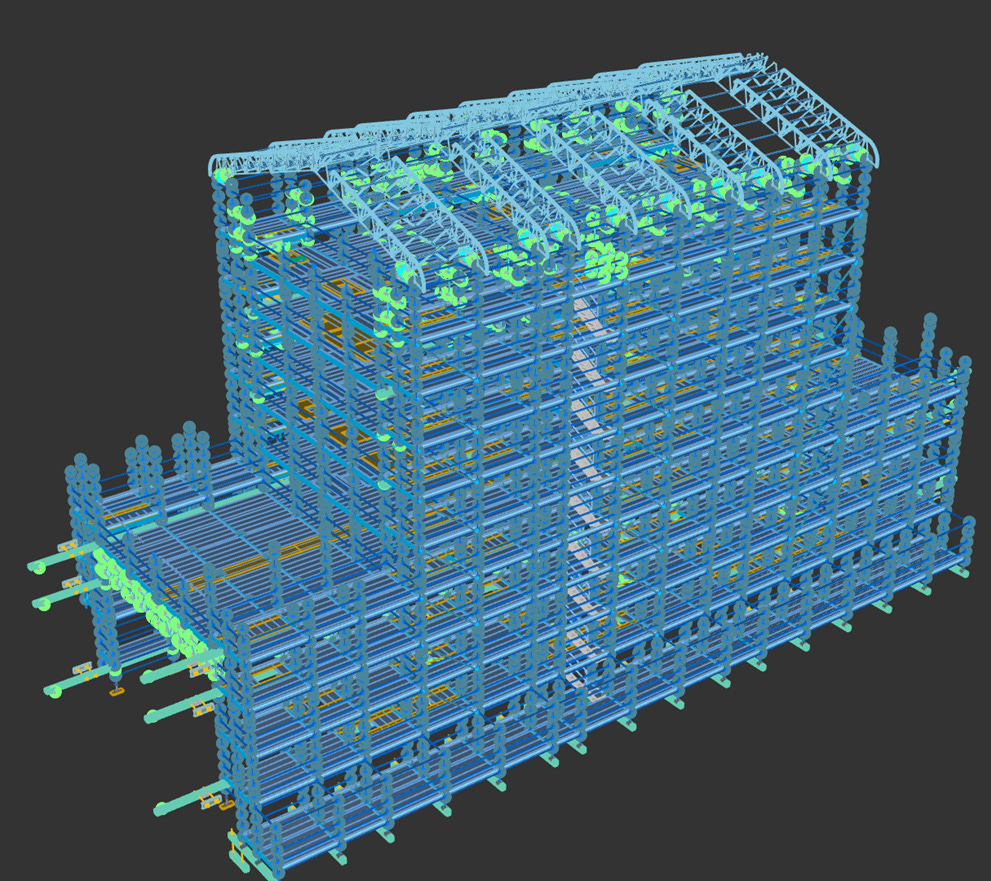
To put some numbers to this: there were 18 stages, so at least 18 models. They did the manual modelling for the first 2 stages (which were the smallest) and it took them 4 days per stage.
With the workflow I built, it didn’t cut the time to zero, but it turned that 4 days per stage into half a day. The script was a clear win for the project.
I mean, just last week, Jo called to tell me the project wrapped up and their client was extremely happy with how fast we could turn around structural reports thanks to the script. In fact, because of the script, the team made a whopping 28% profit margin and I got a pretty big slice of that too.
As we looked through the numbers together, Jo told me
“That workflow was awesome. We get models like that all the time, not as big, but similar. Is there a way we can get this to work on all of them? It’s always the same model. We could cut down the time of any scaffold job by half with this”
I like working with Jo. He understands the value of computational design, and more work means more revenue. It was a no brainer. Hope rears it’s head, whispering to me that maybe this is the script that gets scaled
So, I told Jo that it was possible. Just need a couple of tweaks and some test cases to ensure it works with other models. We agreed on a budget and he sent over some sample models. I got to work on the script.
My first attempt was to just see if the current script works. It doesn’t. But that’s okay, it was expected. Turns out the naming conventions for the scaffold members were not the same. So, I put in a tweak, and got it working. Hope comes back to me, maybe this is the one
So, I tried sample model 2, it failed. This time, the model had different geometry. The “tweak” here took much longer, I had to rewrite parts of the script. But after a week, I got it working.
Because the change was big, I decided to test this new script on the original scaffold model, it failed. So I started putting in another tweak that to fix that. But then it failed on the other models again. It was like playing whack-a-mole but with no end. The worst part is that I chewed through most of the budget that we agreed on.
So I gave Jo a call.
“Hey Jo, I don’t think this is going to work. It’s been about 3 weeks and I haven’t got it to run smoothly for all the model. I know this seemed like a good idea at the time but it’s proving harder than I though. I remember you said most scaffolds just need some hand calculations anyway? Is this still worth pursuing?”, I said.
“Well, you might be right, for most of our scaffold jobs, it only takes half a day to do the analysis. The bridge one is a rare case. But why is it so hard ? Aren’t they all the same type of model? “ Jo replied.
“I thought so too, but they are not. Each scaffold client has a different naming convention. Or different geometry. Or even different modelling approach. It’s possible to fix all of them but I just don’t think it’s worth the investment, unless you think so”, I said.
“I think you might be right. I appreciate your honesty and telling me early before we invested too much into this. Let me run some numbers and get back to you” Jo said before we both hung up.
Jo called a week later telling me what I suspected, that it’s not worth scaling it.
I watched reality take hope down with a flick of the wrist
In computational design, everything is solvable but everything has a cost. I could standardize the naming format, I could write something that cleans the geometry, I could even create something that handles the structural analysis for them.
But the cost was just not worth it. I am just glad I caught that early before actually promising a workflow.
Scaling is a whole other problem
Okay, so why am I telling you this?
Because it illustrates something that isn’t obvious until you’ve lived it: scaling takes more effort than building the original thing. Not just more effort, it’s a totally different kind of effort.
Even though all the models were the “same”, there were hidden assumptions in the bridge scaffold script that I made without even knowing.
The naming was consistent. The geometry style was consistent. The client’s modelling habits were consistent. These are things we take for granted when making a script for a project. It is because of these hidden assumptions that it’s hard to turn any project-based script into a universal system.
You can’t just keep adding on more to what you’ve built. You actually have to step back, and design things differently. If all the naming conventions are different, you can’t just keep adding more names into your script, you have to come up with a way of standardizing it and that’s a different and much harder problem to solve.
Not all things are scalable
Trying to scale everything we make is drinking from the poison chalice. Yet, it’s one of the most common ways of treating computational design solutions.
When you scale something, it’s not just about tweaking the inputs or editing the logic. You have to redesign something from the scratch because of variability that comes with scale. And when you only work on one project or solution, that variability is hidden until you introduce another project.
Jo’s models looked similar. Same software. Same general shapes. But the underlying data was different in ways that mattered. Just because they look the same, doesn’t often mean they are.
I don’t want this to sound like I’m against scaling. That would be hypocritical. I’ve actually helped teams scale solutions successfully.
But I’ve also seen teams pour money into scaling something that was never built to scale. They keep putting band-aids on project based workflows that in a few months time, it’s so brittle and no one dares to touch it because they don’t know how it works and what will break. It sucks and it takes longer but the minute, you think of scaling something, you have to step back and re-design things.
The scaffold script for Jo was exactly that. It saved Jo’s team hundreds of hours on that project. It earned the team and me a good profit. But it was value for that project, with that data, under those conditions. Trying to relive that glory days without proper planning is a recipe for disaster.
Not everything needs to scale. And knowing when to stop is just as important as knowing how to start.
Thanks for reading
Subscribe to CodedShapes and I’ll send you my free guide on how to apply computational design to your work.